Add your profile photo to Microsoft 365
You can add or change your profile photo in Office 365 from Office.com, or while using Office 365 applications on your computer or in a browser on your phone. Your photo will appear everywhere there's a profile photo circle in Office 365.
To add your profile photo to Office 365 for business
Find a photo you want to use and store it on your computer, OneDrive, or other location you can get to. The photo needs to be smaller than 4 MB and can be a .png, jpg, or .gif file.
Sign in to Office 365 account at office.com.
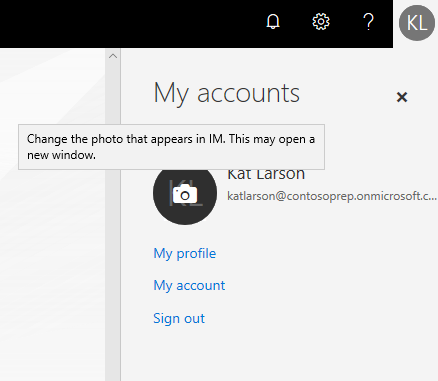
Select the circle in the upper right hand corner of the page that shows your initials or an icon of a person.

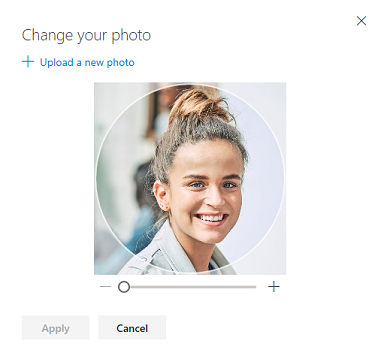
In the My accounts pane, select the circle that shows your initials or an icon of a person. Change your photo in the pop-up that appears.
Related Articles
Accessing Microsoft 365 for the First Time
To begin, you will need your computer with a web browser open and a smart device with a camera. To access Microsoft 365 apps, including Outlook for emails, click on the MSOffice 365 link in the Members Home site: Or go directly to the Microsoft Sign ...
Microsoft 365 Geo-blocking
Scouts Queensland Microsoft 365 accounts are only accessible in Australia to prevent bad actors from getting into the system. This will prevent members' accounts from being accessed outside of Australia. The error message if you are geo-blocked ...
How to reset your Microsoft 365 password
To reset your Microsoft 365 password, you first need to have logged in once and have set up authentication on your account. If you have not done this and need a new password, please contact techsupport@scoutsqld.com.au You will need to have your ...
Get started with Scouts Queensland Microsoft Office 365
Hello, welcome to Microsoft Office 365. If you have received your an email advising your Microsoft Office 365 account has been created, this knowledge base article is designed to help you start using Office 365 with Scouts Queensland. All Members ...
Setting up Microsoft Teams on your PC/Mac or Mobile Device
Microsoft Teams is a free download from Microsoft or the App Store/Google Play Store Please note the screenshots may vary to your device, images supplied are from a Windows 10 PC Setting up Teams on your PC or Mac Download the latest version of ...