Patrol Registrations (including Teams)
The Activity Management System allows events to include Patrol or Team Registration, to support grouping members together. This function is designed for the Scout and Venturer sections to support events in which youth attend and/or compete in a patrol/team of their peers.
Information for Event Organisers on how to setup Patrols/Teams, can be found here: future link.
Specifying your role within the Patrol
When registering as a Participant for an event which includes Patrols, you will need to specify your role within the Patrol.
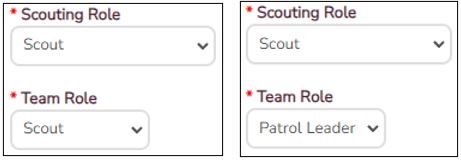
On the bottom of the first page where you enter your membership number, after selecting your Scouting Role, a new box "Team Role" will appear in which you can specify your role, or the "Patrol Leader" if you are the PL for the camp. If you haven’t got your patrol sorted out yet, no worries – leave yourself as a Scout, as this can be updated closer to the event.
Depending on the event, there may be mixed patrols permitted. As a result, the Team Role field will give the option of each participant section and Patrol Leader.
Patrol Leader Responsibilities - Registering the Patrol
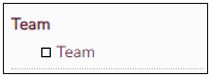
If you selected "Patrol Leader" as your Role, a new menu item will appear called "Team".
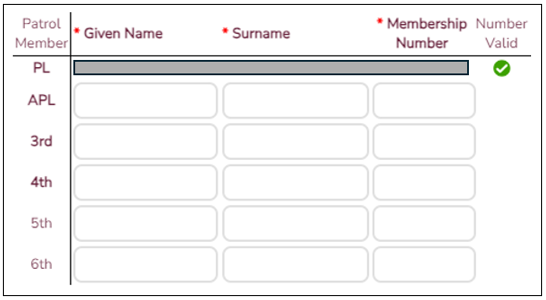
From this menu you can enter in your Patrol Name, and Patrol Members. You need to enter the patrol member First Name, Surname and Membership Number as entered on their application. Depending on the event, you may also be asked who in your Patrol holds a First Aid Certificate.
Related Articles
AMS Elevated Access
Access Levels The Activity Management System (AMS) is broken up into Security Levels, which determine how much information you can see, and Permissions, which are various functions or elements of the system. Security Levels Security Level Detail ...Automatic Emails Register
This article is intended to provide a listing of all Automatic Emails generated by the Activity Management System, with details of when they are sent. All automatically generated emails include the text "This email has been generated by OLEMS, Scouts ...Job Preferences
The Activity Management System allows events to specify Jobs that are available at the event to support organisers identifying suitable Staff to help in various teams. This function is available with a default list of Jobs for every event, however it ...Bulk update
The Bulk Data Update/Allocation feature allows for bulk registrations to be reallocated by such features as Application status or Troop Allocation. In order to utilise this feature, it may be easier to first use a filter to narrow the fields in the ...Consent2Go Q&A
Welcome to the Consent2Go Questions & Answers - initiated on 19 January 2026 as part of the rollout Teams sessions for Scouts Queensland Adult Volunteers. We will continually update this page as new Questions and Answers arise or new details come ...